Appointments allow adult users to schedule time with students. These can be used for immediate meetings or for scheduling meetings ahead of time.
If your school is interested in using the Appointment Pass feature, you will need to make sure this module is enabled. To activate this feature and make the “Appointments” menu option available to your users, to the right of Appointment Pass, slide the toggle to the right.
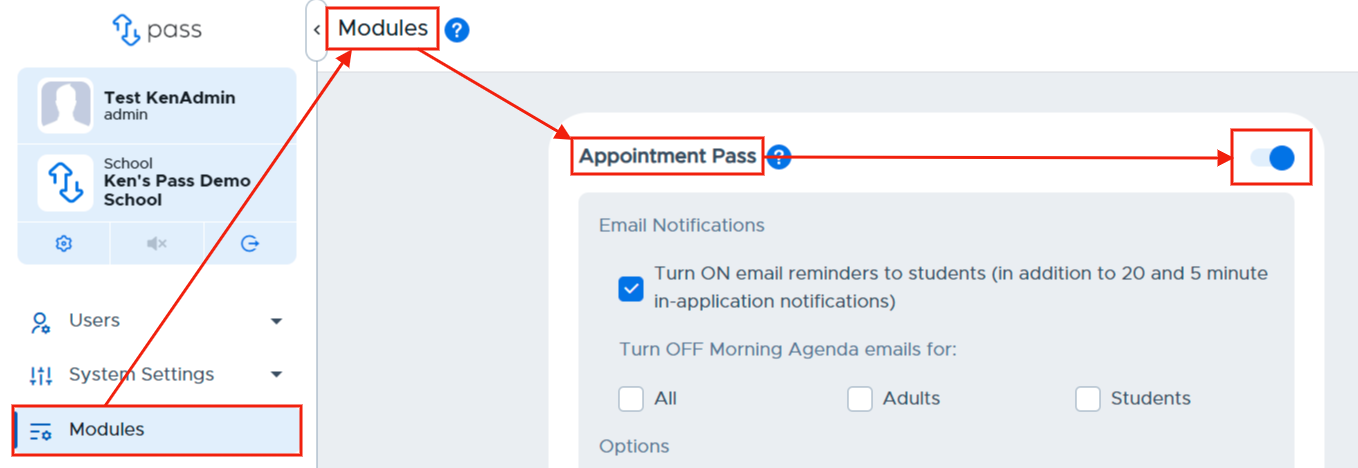
Email Notifications
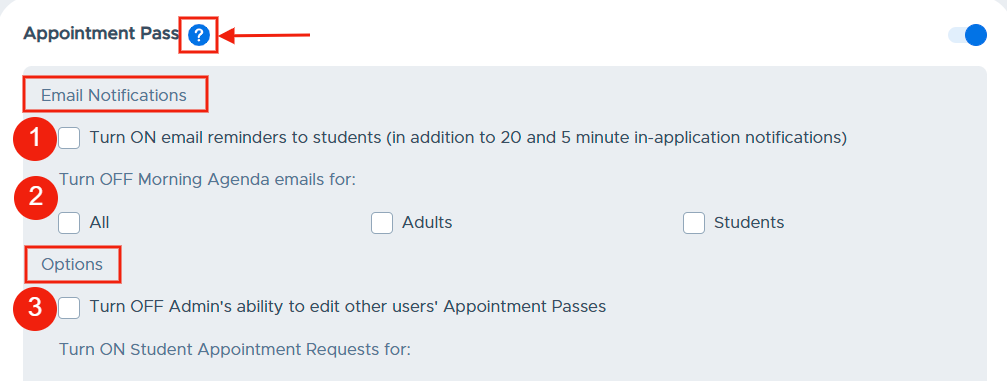
Check the email notifications box if you want students to receive appointment email reminders in addition to the in-application reminders. Please be aware of the following:
- Students will receive 20-minute and 5-minute appointment reminder notifications on their browser or on the mobile app.
- Adults using the mobile app will also receive 20-minute and 5-minute appointment reminders.
Morning Agenda emails will be sent to all USERS ("From" adult, "To" adult, and the student) involved with the appointments scheduled that day. They will NOT be sent for an appointment to a Location, even if users are associated with that location. In order to receive this email, the appointment must be made the previous day. If you would like to prevent the Morning Agenda email from being sent to adults and/or students, check the appropriate box(es).
Other options
By default, admins have the ability to edit other user’s Appointment Passes. Check the corresponding box if you DO NOT want admins to be able to edit another user’s Appointment Passes.
Video Alert"
Please watch the “Turning on Appointment Pass & Notifications” video below.