Securly Sync UI - Customer Guide
A guide for K-12 district IT administrators to view and validate your synced SIS data.
Table of Contents
- Overview
- Logging In
- Getting Started
- Data Readiness
- Data Validation Reference
- Data Viewer
- Coming Soon
- Glossary
- Troubleshooting
- Feedback
Overview
Securly Sync UI allows you to:
- Check data readiness for Securly products before rollout
- Generate reports that highlight missing or incomplete data from your SIS
- Browse synced entities to verify student, staff, class, and enrollment data
- Download CSV exports for detailed analysis and remediation
The data shown in Sync UI comes directly from your Student Information System (SIS) through Securly's rostering integration.
Logging In
Sync UI currently supports login through Google Identity Provider (IDP) only.
Security Requirement: Access to Sync UI requires Multi-Factor Authentication (MFA). By accessing this application, you have confirmed with Securly that your Google account is protected by MFA.
Need to add additional users from your district? Contact support@securly.com to request access for other team members.
Getting Started
When you log in, you'll be automatically directed to the Data Readiness page for your district. Your district identifier is pre-assigned to your account.
Data Readiness
Data Readiness helps you verify that your synced data is complete and properly formatted for Securly products.
Creating Reports
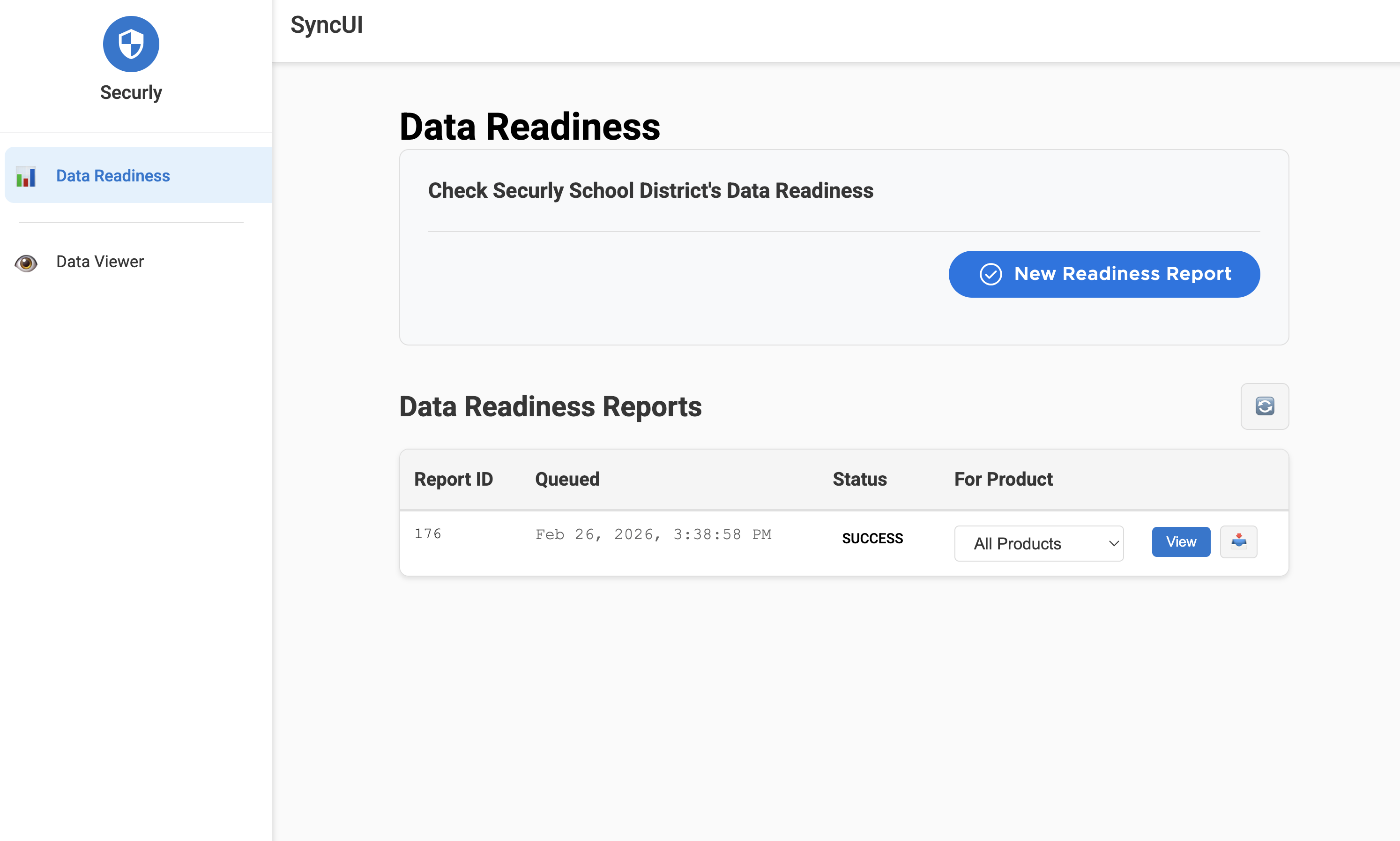
From the Data Readiness page, click New Readiness Report to generate a fresh analysis of your district's data. The report queues immediately and processes in the background.
Reports appear in the table below, sorted with the newest first. Each report shows:
- Report ID - Unique identifier
- Queued - When the report was requested
- Status - Queued, Processing, or Completed
Filtering by Product
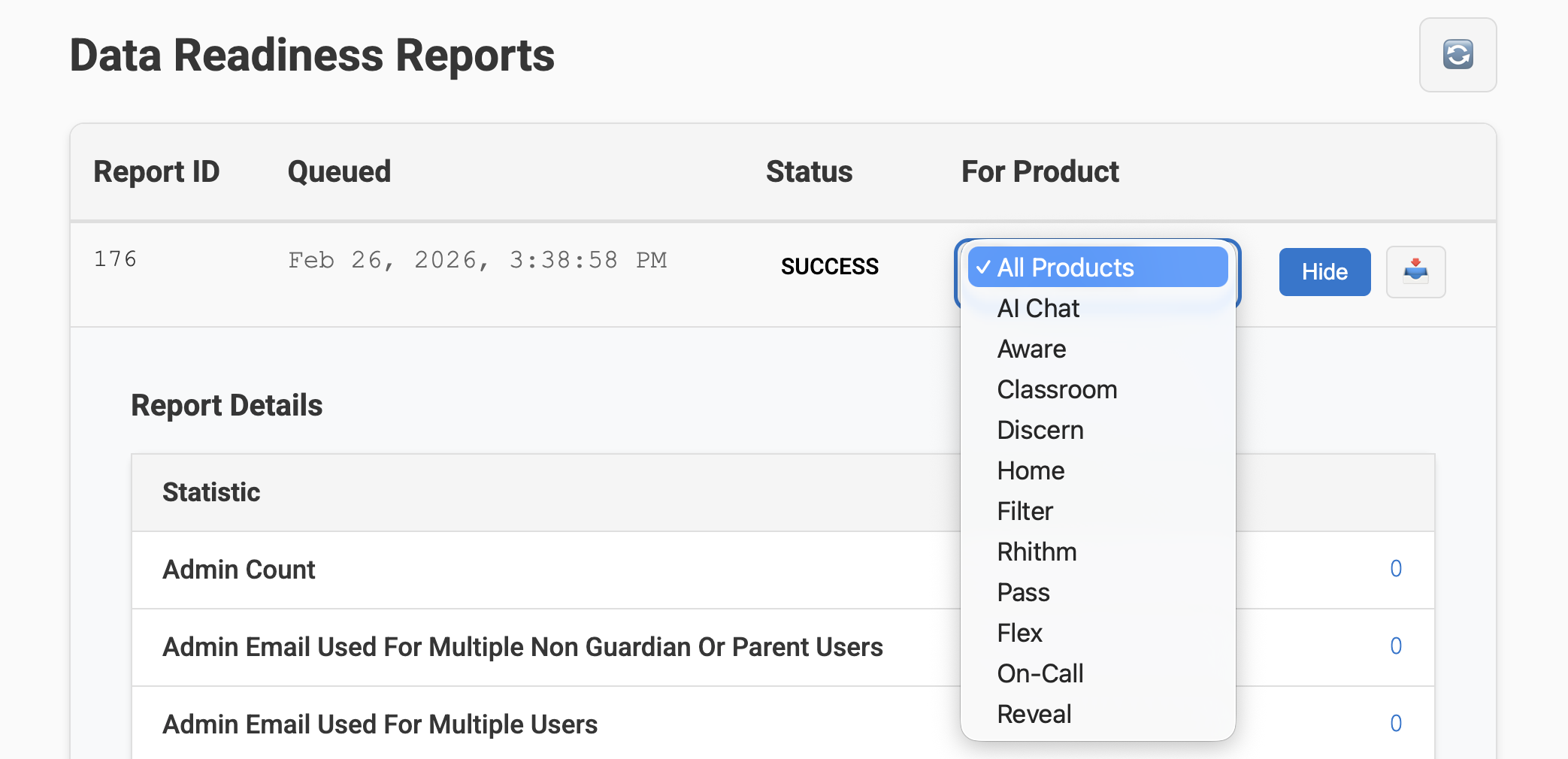
Use the For Product dropdown to filter results for a specific Securly product. This is helpful when troubleshooting issues with a particular product.
Available filters:
- All Products (default)
- AI Chat
- Aware
- Classroom
- Discern
- Filter
- Flex
- Home
- On-Call
- Pass
- Reveal
- Rhithm
Viewing Report Summary
.png)
Click View on any completed report to expand the summary. This shows aggregate counts for each data validation check, giving you a quick overview of potential issues.
Downloading Reports
.png)
Click the download icon to export the report as a CSV file. The export includes user-level details for each data readiness issue, allowing you to:
- Share with your SIS team for remediation
- Filter and sort in Excel or Google Sheets
- Track progress on data cleanup over time
Tip: Select a product filter before downloading to get a focused export for that specific product.
Interpreting Your Results
The Data Readiness Report highlights missing or incomplete data so you can improve data quality over time. However, some entries may appear as "errors" but don't require action.
When "Errors" Are Not Actionable
After you remove or modify records in your SIS (such as deleting a guardian or changing relationships), Securly Sync stops using those records. In some cases, relationship rows tied to removed records may still appear in the report.
Examples of non-actionable entries:
- Guardian-related rows for guardians you've already removed from your SIS
- "Missing data" issues (like missing email/phone) for guardians you no longer use
- Relationship rows pointing to records that no longer exist
These entries are informational noise and don't prevent data from flowing correctly.
Recommended Approach
-
Focus on patterns you recognize - Prioritize entries that map to active schools, students, and guardians in your SIS.
-
De-emphasize orphaned relationships - If a row references a guardian or relationship you've already removed, treat it as informational rather than a blocker.
-
Cross-check in Data Viewer - If you're unsure whether an entry represents a real issue:
- Look up the student or guardian in Data Viewer
- Confirm whether the record matches your current SIS configuration
- If everything looks correct in Data Viewer, the readiness row is likely non-actionable
What to Prioritize
Use Data Readiness to identify:
- Guardians missing email addresses (when those emails should exist)
- Students without any guardian relationships (when your SIS should have them)
- Missing required fields for active users
You can also use Data Readiness to confirm that core entities are syncing correctly:
- Classes - Verify your class sections are present and properly linked
- Orgs - Confirm all schools in your district are synced
- Enrollments - Check that student and teacher enrollments exist for your classes
Expect some false-positive rows during periods of heavy data cleanup (end-of-year rollover, school restructuring, bulk guardian changes).
Have questions about specific entries? Email support@securly.com with examples from your export.
Data Validation Reference
This section explains each validation check in the Data Readiness Report, what it means, and how to resolve issues.
User Validations
Student
Student Has No Email
- Affected Products: All
- Description: A student record exists but has no email address. All Securly products rely on email to identify students.
- Needs to be fixed: Yes
- How to fix: If this number is large, the email field may be missing from your SIS export or mapped incorrectly. If the number is small, it's likely a data entry issue. Update the information in your SIS and run another sync.
Student Has No Guardians
- Affected Products: Home, On-Call
- Description: Student guardians are used to grant access in Home and link contact information in On-Call.
- Needs to be fixed: Yes
- How to fix: If this number is large, the augmentation may not be set up correctly or matching properly. If smaller, the guardian relationship is missing for specific students. Update your SIS and run another sync.
- Note: This metric counts student-guardian relationships. One guardian with two children counts as 2.
- Known Issue: Soft deletes may appear as errors. If the email is empty or the SourcedId starts with
securlyinternal:, this can be ignored.
Student Email Used for Multiple Users
- Affected Products: All
- Description: All products expect each student email to map to exactly one student. Email addresses cannot be shared.
- Needs to be fixed: Yes
- How to fix: If this number is large, there may be an incorrect field mapping (often a misnamed column header). If small, it's likely a data entry issue. Update your SIS and run another sync.
Teacher
Teacher Email Used for Multiple Users
- Affected Products: All
- Description: All products expect each teacher email to map to exactly one teacher.
- Needs to be fixed: Yes
- How to fix: Check for incorrect field mappings or data entry issues. Update your SIS and run another sync.
Administrator
Admin Email Used for Multiple Users
- Affected Products: All
- Description: All products expect each admin email to map to exactly one admin.
- Needs to be fixed: Yes
- How to fix: Check for incorrect field mappings or data entry issues. Update your SIS and run another sync.
Guardian / Parent
Guardian Has No Address
- Affected Products: On-Call
- Description: On-Call will be unable to share address information when working a case.
- Needs to be fixed: Yes
- How to fix: If this number is large, the augmentation may not be set up correctly. If smaller, the address is missing for specific guardians. Download the list and update your SIS.
- Note: This metric counts student-guardian relationships. One guardian with two children counts as 2.
- Known Issue: Soft deletes may appear as errors. If the email is empty or the SourcedId starts with
securlyinternal:, this can be ignored.
Guardian Has No Email
- Affected Products: On-Call, Home
- Description: Home uses email for guardian login. Guardians without email cannot log in. On-Call also uses email to identify guardians.
- Needs to be fixed: Yes
- How to fix: If this number is large, check your augmentation setup. If smaller, the email is missing for specific guardians. Download the list and update your SIS.
- Note: This metric counts student-guardian relationships. One guardian with two children counts as 2.
Class Validations
Terms Link Exists
- Some sync configurations (like RosterStream's maximal compatibility mode) may not include term links for classes.
Courses Link Exists
- Some sync configurations may not include course links for classes.
Enrollment Validations
Teacher Enrollments Exist
- Verifies that teacher enrollments are present. Some advanced settings may affect this.
Student Enrollments Exist
- Verifies that student enrollments are present.
End Date Exists
- End dates are important for rollover and archiving functionality.
Data Viewer
Data Viewer lets you browse the actual synced data for your district to verify records and troubleshoot issues.
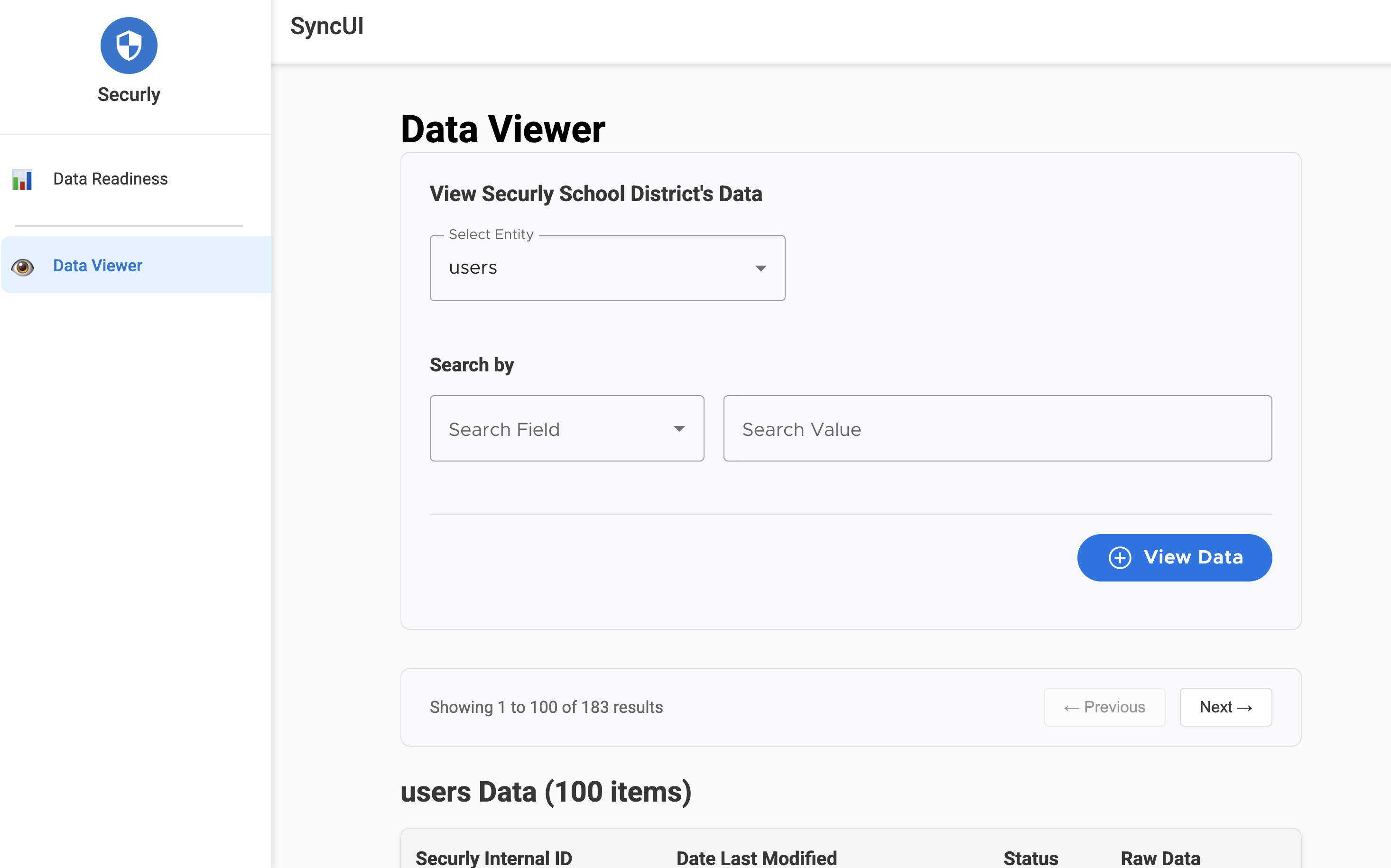
Browsing Entities
Select an entity type from the dropdown:
- Users - Student and staff accounts
- Enrollments - Class enrollment records
- Classes - Class/section information
- Courses - Course catalog entries
- Academic Sessions - School years, terms, semesters
- Demographics - Student demographic data
- Orgs - Schools and organizational units
Click View Data to load records. Results display 100 records per page with pagination controls.
Search and Filtering
Each entity type has specific search fields to help you find records:
| Entity | Search Fields |
|---|---|
| Users | Securly Internal ID, Role, Email, Securly Internal Org ID |
| Enrollments | Securly Internal ID, Role, Securly Internal Class ID, Securly Internal User ID |
| Demographics | Securly Internal ID, Role |
| Classes | Securly Internal ID |
| Courses | Securly Internal ID |
| Academic Sessions | Securly Internal ID |
| Orgs | Securly Internal ID |
Common search workflows:
-
Find a user's enrollments:
- Search Users by Email to find the user
- Copy their Securly Internal ID
- Switch to Enrollments, search by Securly Internal User ID
-
Find students in a class:
- Search Classes to find the class
- Copy the Securly Internal ID
- Switch to Enrollments, search by Securly Internal Class ID
-
Find users at a school:
- Search Orgs to find the school
- Copy the Securly Internal ID
- Switch to Users, search by Securly Internal Org ID
Viewing Raw Data
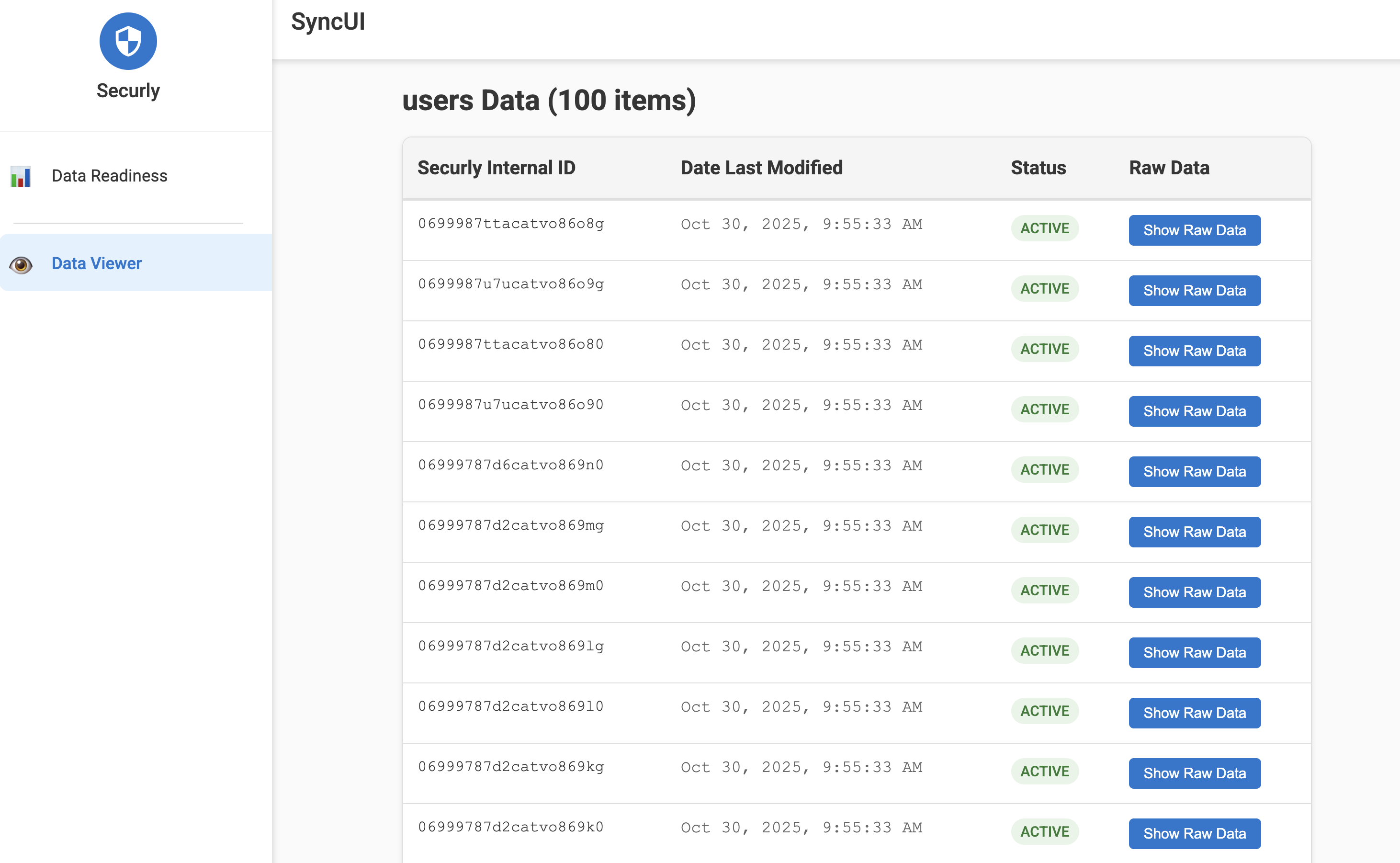
Click Show Raw Data on any record to expand the complete JSON data. This reveals all fields synced from your SIS, including:
- Unique identifiers (sourcedId)
- Status and dates
- Role information
- Relationship references
- Custom metadata
Use raw data to verify specific field values or troubleshoot sync issues.
Entity Reference
Here's what each entity type contains and how they relate:
| Entity | Description | Key Fields |
|---|---|---|
| Users | Students, teachers, staff, guardians | sourcedId, email, role, status, givenName, familyName, orgs |
| Enrollments | Links users to classes with a role | sourcedId, user, class, role, status |
| Classes | Course sections with term/school info | sourcedId, title, course, school, terms, status |
| Courses | Course catalog entries | sourcedId, title, courseCode, status |
| Academic Sessions | School years, semesters, terms | sourcedId, title, type, startDate, endDate, status |
| Demographics | Student demographic information | sourcedId, birthDate, sex, grades |
| Orgs | Schools and district organizational units | sourcedId, name, type, identifier, status |
Relationships:
- Users belong to Orgs (schools)
- Enrollments connect Users to Classes
- Classes reference Courses and Academic Sessions
- Demographics link to Users
Coming Soon
User Management for Customers
Soon you'll be able to manage Sync UI access for your district staff directly. Add team members, set permissions, and control who can view your synced data.
Improved Data Viewer
Enhanced usability and more powerful search capabilities to help you find records faster.
Data Readiness Improvements
Usability enhancements to make interpreting and acting on your reports easier.
Sync Administration
New admin functions including:
- View sync status
- Trigger manual syncs
- Set up sync pausing and scheduling
Glossary
| Term | Definition |
|---|---|
| Securly Internal ID | Unique identifier for each synced record (also called sourcedId) |
| Entity | A type of data record (users, classes, enrollments, etc.) |
| SIS | Student Information System - The source of your synced data |
| Data Readiness | Validation status of your synced data for Securly products |
| Role | User type (student, teacher, administrator, guardian, etc.) |
| Augmentation | The process of enriching student records with guardian/parent data |
Troubleshooting
Common Issues
"No data found" in Data Viewer
- The entity type may have no records matching your search
- Try removing search filters or selecting a different entity type
- Verify the search value is exact (check for extra spaces)
Report shows "No statistics available"
- The report may still be processing - click refresh to check status
- If completed with no stats, your data passed all validation checks
Downloaded CSV is empty
- An empty export means no issues were found for that product filter
- This is a good result - your data is ready
Data doesn't match what's in my SIS
- Sync typically runs on a schedule - recent SIS changes may not be reflected yet
- Contact support@securly.com if data appears significantly outdated
Getting Help
For additional assistance, contact support@securly.com.
Feedback
Your feedback helps us improve Sync UI. If you have suggestions, encounter issues, or want to share how you're using the tool, we'd love to hear from you. Please reach out to support@securly.com.
Last updated: February 2026